

1.动态sql
动态SQL主要是用来解决SQL语句生成的问题。
为什么需要动态SQL?
由于前端传入的查询参数不同,所以写了很多的 if else,还需要非常注意SQL语句里面的 and、空格、逗号和转移的单引号这些,拼接和调试SQL就是一件非常耗时的工作。MyBaits的动态SQL就帮助我们解决了这个问题,它是基于OGNL表达式的。
1.1 动态标签
按照官网的分类,MyBatis 的动态标签主要有四类: if, choose(when,otherwise),trim (where, set),foreach。
1.if
需要判断的时候。比如根据一个字段(deptId) 若 !=“ ”或 null,就以它作为查询条件
<select id="selectDept" parameterType="int" resultType="com.my.crud.bean.Department">
    select * from tbl_dept where 1=1
    <!-- 条件写在test中以下语句可以用<where>改写 -->
    <if test="deptId != null">
        and dept_id = #{deptId,jdbcType=INTEGER}
    </if>
</select>
2.choose (when, otherwise)
需要选择一个条件的时候。比如 empId,empName,email 都可以作为查询条件,而我执行以其中一个作为实际条件.
注:与 if 的区别是 choose当一个条件(when)符合就退出判断
<select id="getEmpList_choose" resultMap="empResultMap" parameterType="com.my.crud.bean.Employee">
    SELECT * FROM tbl_emp e
    <where>
    	<choose>
            <when test="empId !=null">
                e.emp_id = #{emp_id, jdbcType=INTEGER}
            </when>
            <when test="empName != null and empName != ''">
                AND e.emp_name LIKE CONCAT(CONCAT('%', #{emp_name, jdbcType=VARCHAR}),'%')
            </when>
            <when test="email != null ">
                AND e.email = #{email, jdbcType=VARCHAR}
            </when>
            <otherwise>
            </otherwise>
        </choose>
    </where>
</select>
3.foreach
需要遍历集合的时候。比如要批量删除 empId=[1,2,3,4,5] 的记录
<delete id="deleteByList" parameterType="java.util.List">
    delete from tbl_emp where emp_id in
    <foreach collection="list" item="item" open="[" separator="," close="]">
        #{item.empId,jdbcType=VARCHAR}
    </foreach>
</delete>
4.trim (where, set)
需要去掉 where、and、逗号之类的符号的时候。比如去掉指定前缀后缀
注:d_id 和最后一个参数 dId 多了一个逗号,就是用trim去掉的:
<insert id="insertSelective" parameterType="com.my.crud.bean.Employee">
    insert into tbl_emp
    <trim prefix="(" suffix=")" suffixOverrides=",">
        <if test="empId != null">
            emp_id,
        </if>
        <if test="empName != null">
            emp_name,
        </if>
        <if test="dId != null">
            d_id,
        </if>
    </trim>
    <trim prefix="values (" suffix=")" suffixOverrides=",">
        <if test="empId != null">
            #{empId,jdbcType=INTEGER},
        </if>
        <if test="empName != null">
            #{empName,jdbcType=VARCHAR},
        </if>
        <if test="dId != null">
            #{dId,jdbcType=INTEGER},
        </if>
    </trim>
</insert>
1.2 批量操作(CRUD)
我们在生产的项目中会有一些批量操作的场景,比如导入文件批量处理数据的情况(批量新增商品、批量修改用户信息),当数据量非常大,比如超过几万条的时候,在Java代码中循环发送SQL到数据库执行肯定是不现实的,因为这个意味着要跟数据库创建几万次会话,即使我们使用了数据库连接池技术,对于数据库服务器来说也是不堪重负的。
在MyBatis里面是支持批量的操作的,包括批量的插入、更新、删除。我们可以直接传入一个 List、Set、Map 或者数组,配合动态SQL的标签,MyBatis会自动帮我们生成语法正确的SQL语句。比如我们来看两个例子,批量插入和批量更新。
1.批量插入
批量插入的语法是这样的,只要在values后面增加插入的值就可以了。
insert into tbl_emp (emp_id, emp_name, gender,email, d_id)
	values ( ?,?,?,?,? ) , ( ?,?,?,?,? ) , ( ?,?,?,?,? ) , ( ?,?,?,?,? ) ,
(?,?,?,?,?),(?,?,?,?,?),(?,?,?,?,?),(?,?,?,?,?),(?,?,?,?,?),(?,?,?,?,?)
具体步骤如下:
- Java代码里面,直接传入一个List类型的参数。
	@Test
    public void testBatchInsert() {
        List<Employee> list = new ArrayList<Employee>();
        long start = System.currentTimeMillis();
        int count = 100000;
        // max_allowed_packet 默认 4M,所以超过长度会报错
        for (int i=0; i< count; i++) {
            String gender = i%2 == 0 ? "M" : "F";
            Integer did = i%2 == 0 ?  1 : 2;
            Employee emp = new Employee(null, "TestName"+i, gender, "pony@baidu.com", did);
            list.add(emp);
        }

        employeeMapper.batchInsert(list);
        long end = System.currentTimeMillis();
        System.out.println("批量插入"+count+"条,耗时:" + (end -start )+"毫秒");

    }
- 在Mapper文件里面,我们使用 foreach 标签拼接 values 部分的语句:
<!-- 批量插入 -->
<insert id="batchInsert" parameterType="java.util.List" useGeneratedKeys="true">
    <selectKey resultType="long" keyProperty="id" order="AFTER">
        SELECT LAST_INSERT_ID()
    </selectKey>
    insert into tbl_emp (emp_id, emp_name, gender,email, d_id) values
    <foreach collection="list" item="emps" index="index" separator=",">
        ( #{emps.empId},#{emps.empName},#{emps.gender},#{emps.email},#{emps.dId} )
    </foreach>
</insert>
我们来测试一下。效率要比循环发送SQL执行要高得多。最关键的地方就在于减少了跟数据库交互的次数,并且避免了开启和结束事务的时间消耗。
/**
 * 循环插入
 */
@Test
public void testCRUD() {
    long start = System.currentTimeMillis();
    int count = 10;
    for (int i=0; i< count; i++) {
        String gender = i%2 == 0 ? "M" : "F";
        employeeMapper.insertSelective(new Employee(null, "TestName"+i, gender, "mahuateng@baidu.com", 1));
    }
    long end = System.currentTimeMillis();
    System.out.println("循环批量插入"+count+"条,耗时:" + (end -start )+"毫秒");
}
2.批量更新
批量更新的语法是这样的,通过case when,来匹配id相关的字段值。
update tbl_emp set
emp_name =
	case emp_id
				when ? then ?
				when ? then ?
				when ? then ? end ,
gender =
	case emp_id
				when ? then ?
				when ? then ?
				when ? then ? end ,
email =
	case emp_id
				when ? then ?
				when ? then ?
				when ? then ? end
where emp_id in ( ? , ? , ? )
具体步骤同上。 Mapper文件里面最关键的就是case when和where的配置。需要注意一下open属性和separator属性。
<update id="updateBatch">
        update tbl_emp set
        emp_name =
        <foreach collection="list" item="emps" index="index" separator=" " open="case emp_id" close="end">
            when #{emps.empId} then #{emps.empName}
        </foreach>
        ,gender =
        <foreach collection="list" item="emps" index="index" separator=" " open="case emp_id"  close="end">
            when #{emps.empId} then #{emps.gender}
        </foreach>
        ,email =
        <foreach collection="list" item="emps" index="index" separator=" " open="case emp_id" close="end">
            when #{emps.empId} then #{emps.email}
        </foreach>
        where emp_id in
        <foreach collection="list" item="emps" index="index" separator="," open="(" close=")">
            #{emps.empId}
        </foreach>
</update>
批量删除也是类似的。
1.3 BatchExecutor
当然MyBatis的动态标签的批量操作也是存在一定的缺点的,比如数据量特别大的时候,拼接出来的SQL语句过大。
MySQL 服务端对于接收数据包有大小限制,max_allowed_packet 默认是4M,需要修改默认配置才可以解决这个问题。
Caused by: com.mysql.jdbc.PacketTooBigException: Packet for query is too large (7188967 > 4194304).
You can change this value on the server by setting the max_allowed_packet' variable.
在我们的全局配置文件中,可以配置默认的 Executor 的类型。其中有一种BatchExecutor。
<setting name="defaultExecutorType" value="BATCH" />
也可以在创建会话的时候指定执行器类型:
SqlSession session = sqlSessionFactory.openSession(ExecutorType. BATCH );
BatchExecutor底层是对JDBCps.addBatch()的封装,原理是攒一批SQL以后再发送
2.关联查询
我们在查询业务数据的时候经常会遇到跨表关联查询的情况,比如查询员工就会关联部门(一对一),查询订单就会关联商品(一对多),等等。
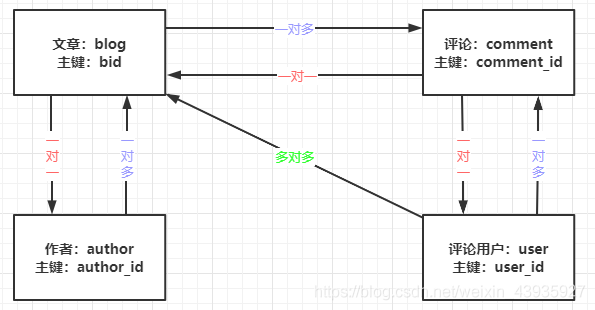
我们映射结果有两个标签,一个是 resultType,一个是 resultMap。
- resultType
- 是 select 标签的一个属性
- 适用于返回JDK类型(比如Integer、String等)和实体类(这种情况下结果集的列和实体类属性可以直接映射)
- resultMap
- 是 Mapper.xml 映射文件的一个标签
- 用于关联查询,通过封装 ResultMap 对联查结果进行映射(association,collections)
还有一种不常用的方法是在dto中执行将关联对象字段添加进来(不赞成,开销大冗余多)
2.1 一对一(association)
一对一的关联查询有两种配置方式
1.嵌套结果:封装查询字段,使用时一条sql全部查询出来
   <!-- 根据文章查询作者,一对一查询的结果,嵌套查询 -->
   <resultMap id="BlogWithAuthorResultMap" type="com.my.domain.associate.BlogAndAuthor">
       <id column="bid" property="bid" jdbcType="INTEGER"/>
       <result column="name" property="name" jdbcType="VARCHAR"/>
       <!-- 联合查询,将author的属性映射到ResultMap -->
       <association property="author" javaType="com.my.domain.Author">
           <id column="author_id" property="authorId"/>
           <result column="author_name" property="authorName"/>
       </association>
   </resultMap>

   <!-- 根据文章查询作者,一对一,嵌套结果,无 N+1问题 -->
   <select id="selectBlogWithAuthorResult" resultMap="BlogWithAuthorResultMap">
       select b.bid, b.name, b.author_id, a.author_id , a.author_name
       from blog b
       left join author a
       on b.author_id=a.author_id
       where b.bid = #{bid, jdbcType=INTEGER}
   </select>
2.嵌套查询:分两条sql,父sql执行一次,对于所有执行结果都执行一次子sql(1+N)
<!-- 另一种联合查询(一对一)的实现,但是这种方式有“N+1”的问题 -->
<resultMap id="BlogWithAuthorQueryMap" type="com.my.domain.associate.BlogAndAuthor">
    <id column="bid" property="bid" jdbcType="INTEGER"/>
    <result column="name" property="name" jdbcType="VARCHAR"/>
    <association property="author" javaType="com.my.domain.Author"
                 column="author_id" select="selectAuthor"/> <!-- selectAuthor 定义在下面-->
</resultMap>

<!-- 根据文章查询作者,一对一,嵌套查询,存在N+1问题,可通过开启延迟加载解决 -->
    <select id="selectBlogWithAuthorQuery" resultMap="BlogWithAuthorQueryMap" >
        select b.bid, b.name, b.author_id, a.author_id , a.author_name
        from blog b
        left join author a
        on b.author_id=a.author_id
        where b.bid = #{bid, jdbcType=INTEGER}
    </select>
- N+1 问题:由于是分两次查询,当我们查询了员工信息之后,会再发送一条SQL到数据库查询部门信息。我们只执行了一次查询员工信息的SQL(所谓的1),如果返回了N条记录,就会再发送 N条到数据库查询部门信息(所谓的 N),这个就是我们所说的 N+1的问题。这样会白白地浪费我们的应用和数据库的性能。
- N+1 解决:开启延时加载,当用到部门信息时再去查询
<!-- 延迟加载的全局开关。当开启时,所有关联对象都会延迟加载。默认 false  -->
<setting name="lazyLoadingEnabled" value="true"/>
<!-- 决定了是不是对象的所有方法都会触发查询-->
<!-- 当开启时,任何方法调用都会加载该对象的所有属性。默认 false,可通过select标签 fetchType 来覆盖-->
<setting name="aggressiveLazyLoading" value="false"/>
2.2 一/多对多(collection)
现在我们有一个需求,查询所有文章包括所有评论及评论的所有回复,所以是一个多对多对多的查询
<resultMap id="NoteResultMap" type="Note">
   <result property="noteTitle" column="note_title"/>
   <result property="noteContent" column="note_content"/>
   <result property="noteDate" column="note_date"/>
   <result property="labId" column="lab_id"/>
   <result property="authorName" column="author_name"/>
   <result property="picUrl" column="pic_url"/>
   <!-- 下面是 collectin 嵌套 collection -->
   <collection property="comments" ofType="Comment">
      <result property="comContent" column="com_content"/>
      <result property="comDate" column="com_date"/>
      <result property="authorName" column="author_name"/>
      <collection property="replies" ofType="Reply">
         <result property="repContent" column="rep_content"/>
         <result property="repDate" column="rep_date"/>
         <result property="authorName" column="author_name"/>
      </collection>
   </collection>
</resultMap>

<select id="findNote" parameterType="Integer" resultMap="NoteResultMap">
		SELECT 	note_title,
				note_content,
				lab_id,
				note_date,
				note.`author_name`,
				pic_url,
				com_content,
				com_date,
				comment.`author_name`,
				rep_content,
				rep_date,
				reply.`author_name`
		FROM (note LEFT JOIN COMMENT ON to_note_id=note_id)
				LEFT JOIN reply ON to_com_id=com_id
		WHERE note.`note_id`=#{noteId}
</select>
3.翻页
3.1 逻辑翻页(假分页)
逻辑翻页的原理是把所有数据查出来,在内存中删选数据。
MyBatis 里面有一个逻辑分页对象 RowBounds,里面主要有两个属性,offset 和limit(从第几条开始,查询多少条)。使用步骤如下:
1)在Mapper接口的方法上加上这个参数, 不需要修改 xml 里面的SQL语句
public List<Blog> selectBlogList(RowBounds rowBounds)
2)使用Mapper时,直接传入new RowBounds(offset, limit)即可
// offset,从第几行开始查询
int start = 10;
// limit,查询多少条
int pageSize = 5;
RowBounds rb = new RowBounds(start, pageSize);
// 已经是对应页结果
List<Blog> list = mapper.selectBlogList(rb);
for(Blog b :list){
    System. out .println(b);
}
它的底层其实是对 ResultSet 的处理。它会舍弃掉前面 offset 条数据,然后再取剩下的数据的 limit条。
很明显,如果数据量大的话,这种翻页方式效率会很低(跟查询到内存中再使用subList(start,end)没什么区别)。所以我们要用到物理翻页。
3.2 物理翻页(真分页)
物理翻页是真正的翻页,它是通过数据库支持的语句来翻页。比如 MySQL 使用limit 语句,Oracle 使用 rownum 语句,SQLServer 使用 top 语句。
方式1:手动 sql 语句,传入当前页与页面大小
<select id="selectBlogPage" parameterType="map" resultMap="BaseResultMap">
    select * from blog limit #{curIndex} , #{pageSize}
</select>
问题:
- 我们要在Java代码里面去计算起止序号;
- 每个需要翻页的Statement都要编写 limit 语句,会造成 Mapper 映射器里面很多代码冗余。
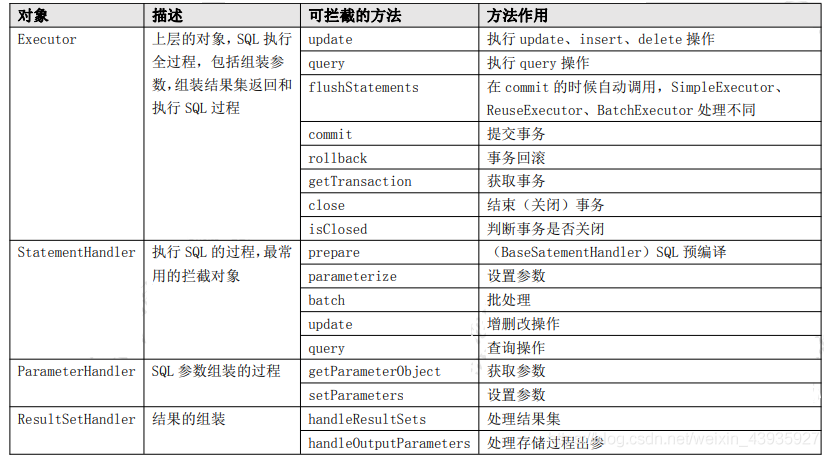
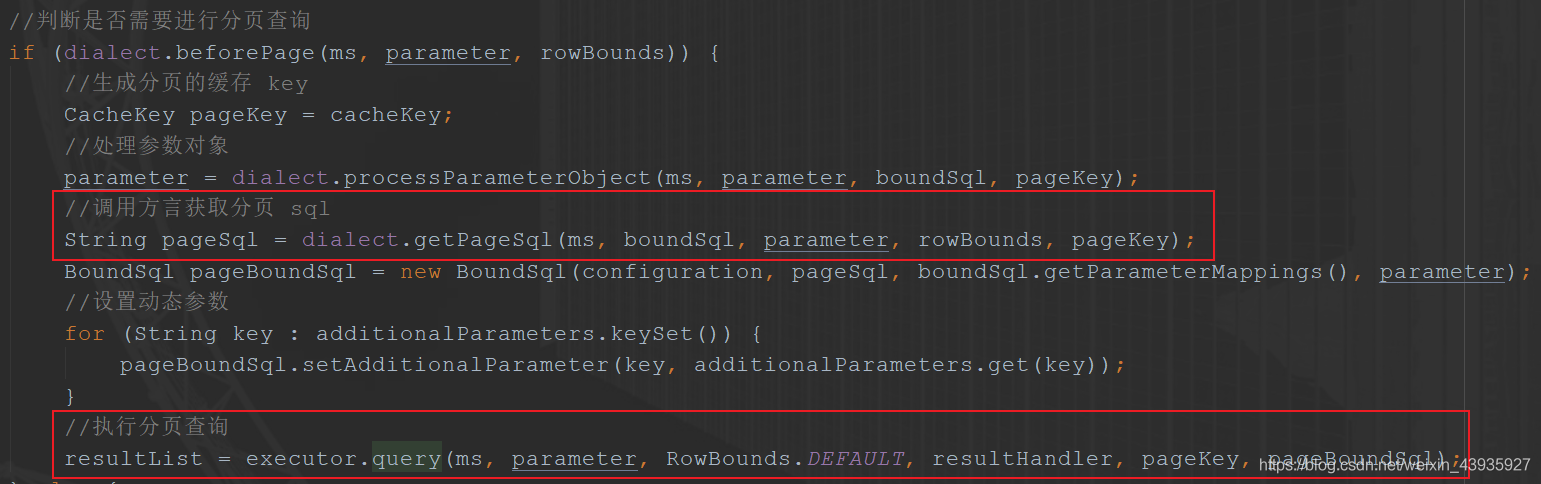
那我们就需要一种通用的方式,不需要去修改配置的任何一条SQL语句,只要在我们需要翻页的地方封装一下翻页对象就可以了。我们最常用的做法就是使用翻页的插件,这个是基于MyBatis的拦截器实现的,比如 PageHelper。
方式2:PageHelper
// 当前页,页大小
PageHelper. startPage (pn, 10);
List<Employee> emps = employeeService.getAll();
// 传入sql与当前页大小
PageInfo page = new PageInfo(emps, 10);
return Msg. success ().add("pageInfo", page);
对了,在使用 PageHelper 前还要引入它的依赖包
<dependency>
    <groupId>com.github.pagehelper</groupId>
    <artifactId>pagehelper-spring-boot-starter</artifactId>
    <version>1.2.3</version>
</dependency>


还没有评论,来说两句吧...