

页面返回的原型图如下: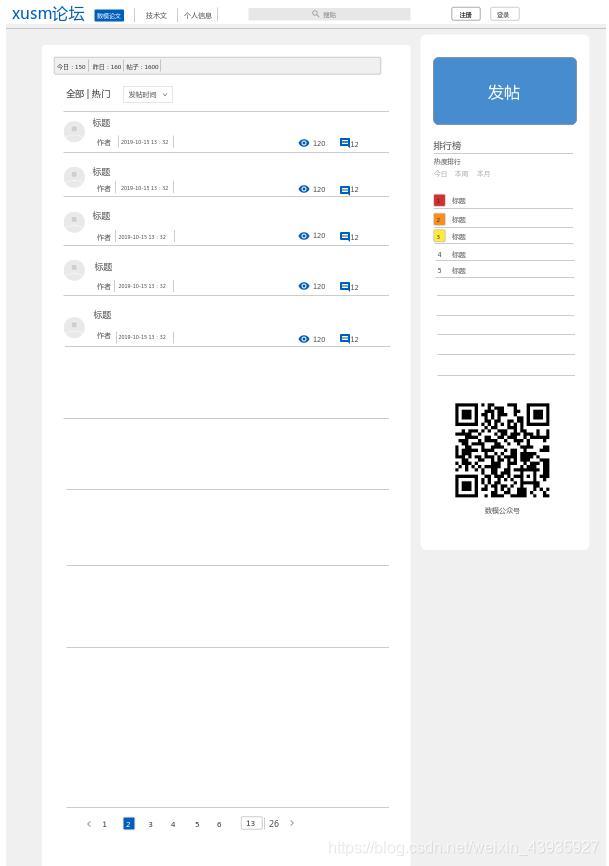
在后来开发过程中,又加了置顶功能和显示点赞数:
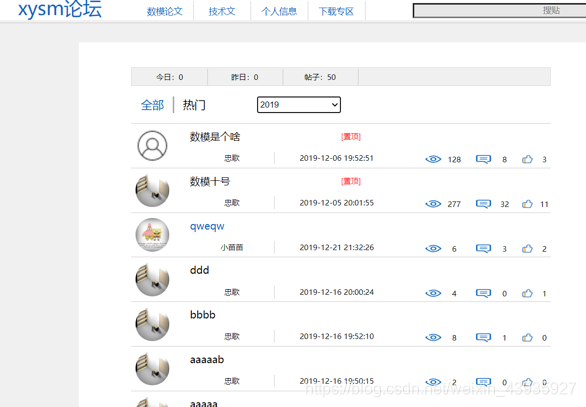
1.返回结果分析
文章列表
- 两个模块:
- 首页默认是数模论文
- 点击技术文后跳到技术文
- 年份筛选
- 默认年份是当前年
- 可以自己选择年份
- 搜过筛选
- 根据搜索框的关键词,与文章标题模糊匹配
- 根据搜索框的关键词,与作者名模糊匹配
- 排序方案
- 默认按时间降序排列,置顶文章放到最前(管理端设置)
- 点击热门后按照浏览量排序,置顶文章放到最前(管理端设置)
注:置顶显示是后来管理端原型图出来之后才知道的,所以要修改代码。。。
=> 实现思路
-
对于两个模块,在 article表中设置一个 type 字段,然后接口中传入 type
- type=1 是数模论文
- type=2 是技术文
-
对于年份筛选,在接口中传入指定年份,在查询时拿创建的年份做个判断就行了
-
对于搜索筛序,在接口中传入搜索词,如果搜索词不为 null,做一个筛序就行了
-
对于是按时间排序还是点击量排序,article表不用新建字段,我们只用在接口中传入一个 ishot 属性
- istop=false:按照发布日期排序(降序)
- istop=true:按照点击量排序(降序)
对于无论何种排序方案,置顶文章排在最前面,在 article表中添加一个 sort 字段,返回结果中添加一个 istop
- 发布文章时,sort = 0,表示不置顶
- 管理端置顶某篇文章时,就将 sort 置为 1
- 获取文章列表时,首先按照 sort 排序,然后再根据发布日期或者点击排序
- 在返回数据时判断如果 sort > 0,那么该文章的 istop=true,否则该文章的 istop=false
- 管理端取消某篇文章的置顶时,就将 sort 置为 0
文章统计信息
- 有帖子的年份
- 今日发帖数
- 昨日发帖数
- 今年帖子总数
分页信息
- 总共有多少页
2.返回结果封装
PageResult
public class PageResult {
    // 总页数
    private Integer totalPage;
	// 文章列表
    private List<ArticleListDto> articles;
	// 统计信息
    private Map<String,Object> info;

    // getter、setter...
}
ArticleListDto
文章列表返回结果
public class ArticleListDto {
	// 文章 ID
    private Long id;
	// 文章标题
    private String title;
	// 作者名
    private String authorName;
	// 作者头像
    private String authorHead;
	// 文章点赞数
    private Integer alike;
    // 文章点击数
    private Long click;
	// 文章评论数
    private Integer commentCount;
	// 文章是否置顶
    private Boolean istop;
	// 文章创建日期
    @JsonFormat(pattern = "yyyy-MM-dd HH:mm:ss",timezone = "GMT+8")
    private Date create;

    // getter、setter...
}
3.代码实现
Controller
提供返回页面数据接口
@PostMapping("/list")
public ResponseEntity<PageResult> queryArticleList(
        @RequestParam(value = "type",defaultValue = "1") Integer type, // 文章类型
        @RequestParam(value = "ishot",defaultValue = "false")Boolean ishot, // 热门
        @RequestParam(value = "page",defaultValue = "1")Integer page,
        @RequestParam(value = "row",defaultValue = "7")Integer row,
        @RequestParam(value = "key",required = false)String key, // 搜索词
        @RequestParam(value = "year",required = false)String year // 文章年份
){
    PageResult result = this.articleService.queryArticleList(type,ishot,page,row,key,year);
    return ResponseEntity.ok(result);
}
Service
组装数据的具体逻辑
@Override
public PageResult queryArticleList(Integer type, Boolean ishot, Integer page, Integer row, String key, String year) {

    // 如果入参没有年份,就取当年
    if(StringUtils.isBlank(year)){
        year = new SimpleDateFormat("yyyy").format(new Date());
    }

    // PageHelper 分页
    PageHelper.startPage(page,row);
    // 分页查询符合条件的文章列表
    List<Article> articles = this.articleDao.selectArticleList(type,ishot,key,year);
    PageInfo<Article> pageInfo = new PageInfo<>(articles);

    // 构建文章信息返回结果 List<ArticleListDto>
    List<Article> art = pageInfo.getList();
    List<ArticleListDto> articleDtos = art.stream().map(l->{
        ArticleListDto dto = new ArticleListDto();
        dto.setIstop(l.getSort() > 0 ? true : false);
        dto.setAuthorName(l.getUserDetail().getUsername());
        dto.setAuthorHead(l.getUserDetail().getHead());
        dto.setClick(l.getClick());
        dto.setCommentCount(l.getCommentCount());
        dto.setCreate(l.getCreated());
        dto.setAlike(l.getAlike());
        dto.setId(l.getId());
        dto.setTitle(l.getTitle());
        return dto;
    }).collect(Collectors.toList());

    // 构建统计信息
    Map<String,Object> map = new HashMap<>();
    map.put("years",this.articleDao.queryYears(type)); // 有帖子的年份
    map.put("today",this.articleDao.queryTodyCount(type)); // 今日发帖数
    map.put("yesterday",this.articleDao.queryYesterdayCount(type)); // 昨日发帖数
    map.put("total", (int) pageInfo.getTotal()); // 今年发帖数,直接取查询的总条数就行了

    // 构建总体返回结果
    // 总页数,文章列表,统计信息
    return new PageResult(pageInfo.getPages(),articleDtos,map);
}
Dao
用到的 SQL 语句
public interface ArticleDao extends Mapper<Article> {

    List<Article> selectArticleList(@Param("type") Integer type, @Param("ishot") Boolean ishot, @Param("key") String key, @Param("year") String year);

    @Select("select YEAR(created) year from article WHERE type=#{type} GROUP BY year ORDER BY year DESC")
    List<String> queryYears(@Param("type") Integer type);

    @Select("SELECT count(1) FROM article WHERE DATEDIFF(created,NOW())=0 AND state=1 AND type=#{type}")
    Integer queryTodyCount(@Param("type") Integer type);

    @Select("SELECT count(1) FROM article WHERE DATEDIFF(created,NOW())=-1 AND state=1 AND type=#{type}")
    Integer queryYesterdayCount(@Param("type") Integer type);

}
selectArticleList 方法的 SQL 语句如下:
<!DOCTYPE mapper PUBLIC "-//mybatis.org//DTD Mapper 3.0//EN" "http://mybatis.org/dtd/mybatis-3-mapper.dtd" >
<!-- namespace -->
<mapper namespace="com.xusm.forum.dao.ArticleDao">

    <!-- 封装 ResultMap,主要是因为有关联查询 -->
    <resultMap id="articleMap" type="com.xusm.forum.entity.Article">
        <id property="id" column="id"/>
        <result property="click" column="click"/>
        <result property="created" column="created"/>
        <result property="title" column="title"/>
        <result property="commentCount" column="comment_count"/>
        <result property="sort" column="sort"/>
        <result property="alike" column="alike"/>
        <!-- 联查结果封装(一对一) -->
        <association property="userDetail" javaType="com.xusm.forum.entity.UserDetail">
            <result property="username" column="username"/>
            <result property="head" column="head"/>
        </association>
    </resultMap>

    <select id="selectArticleList" resultMap="articleMap">
        select id,created,title,comment_count,click,sort,alike,
                username,head
        FROM article a LEFT JOIN user_detail u ON a.author=u.user_id
        where
          <!-- 文章状态 -->
          state = 1
          <!-- 文章类型 -->
          <if test="type != 3">
              and type=#{type}
          </if>
          <!-- 年份筛选 -->
          and year(created)=#{year}
          <!-- 搜索筛选 -->
          <if test="key != null and key.trim()!=''">
              and title like concat('%',#{key},'%')
              or author in (SELECT user_id FROM user_detail WHERE username like CONCAT('%',#{key},'%') )
          </if>
          <!-- 排序 -->
          ORDER BY sort DESC,
          <if test="!ishot">
              created DESC
          </if>
          <if test="ishot">
              click DESC
          </if >
    </select>
</mapper>
本文标题:【项目杂记】记页面返回结果组装及置顶功能实现
本文链接:https://blog.quwenai.cn/post/9853.html
版权声明:本文不使用任何协议授权,您可以任何形式自由转载或使用。

还没有评论,来说两句吧...