

pom文件加入如下依赖
<dependency>
	<groupId>io.springfox</groupId>
	<artifactId>springfox-swagger2</artifactId>
	<version>2.6.1</version>
</dependency>

<dependency>
	<groupId>io.springfox</groupId>
	<artifactId>springfox-swagger-ui</artifactId>
	<version>2.6.1</version>
</dependency>
启动类上加入@EnableSwagger2注解
@EnableSwagger2
@SpringBootApplication
@MapperScan("com.st.blog.dao")
public class BlogApplication {

	public static void main(String[] args) {
		SpringApplication.run(BlogApplication.class, args);
	}

}
增加配置类
@Configuration
public class Swagger2Config {

    /** 访问http://localhost:8080/swagger-ui.html */
    @Bean
    public Docket createRestApi() {
        return new Docket(DocumentationType.SWAGGER_2)
                .apiInfo(apiInfo())
                .select()
                //这里写controller的包名
                .apis(RequestHandlerSelectors.basePackage("com.st.blog.controller"))
                .paths(PathSelectors.any())
                .build();
    }

    private ApiInfo apiInfo() {
        return new ApiInfoBuilder()
                .title("springboot利用swagger构建api文档")
                .description("www.erlie.cc 编程视频资源共享网站")
                .termsOfServiceUrl("www.erlie.cc")
                .version("1.0")
                .build();
    }
}
访问http://localhost:8080/swagger-ui.html
所有的controller都显示出来了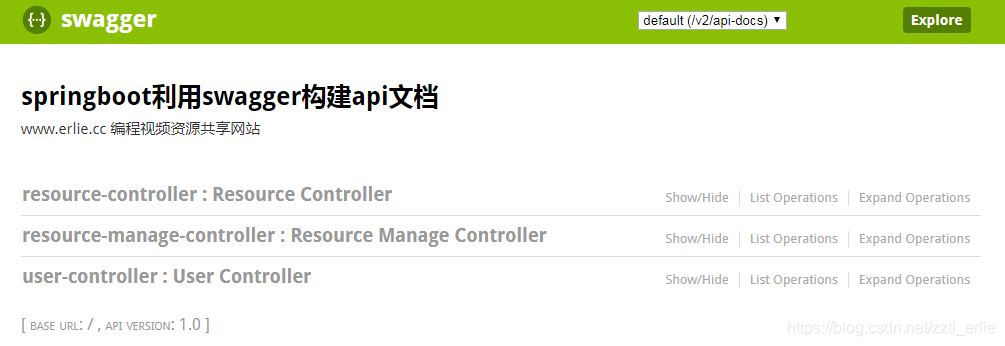
取其中一个例子,示例返回以及要填的各种参数都已经帮你弄好了,直接填入参数就能测试,非常方便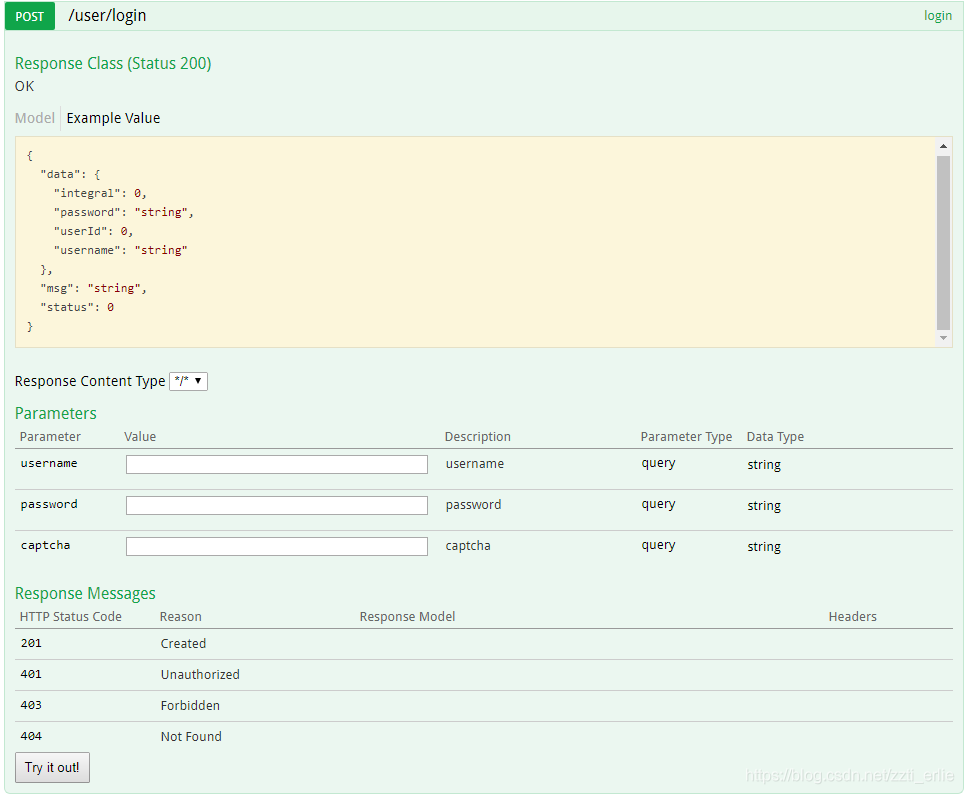
导出文档
可以建测试页面导出为各种格式的文档,不再介绍
Swagger注解
可以用Swagger提供的注解,对显示在页面的上的各种参数进行描述,和代码耦合性比较高,不再演示
@Api:修饰整个类,描述Controller的作用
@ApiOperation:描述一个类的一个方法,或者说一个接口
@ApiParam:单个参数描述
@ApiModel:用对象来接收参数
@ApiProperty:用对象接收参数时,描述对象的一个字段
@ApiResponse:HTTP响应其中1个描述
@ApiResponses:HTTP响应整体描述
@ApiIgnore:使用该注解忽略这个API
@ApiError :发生错误返回的信息
@ApiImplicitParam:一个请求参数
@ApiImplicitParams:多个请求参数
参考博客
本文标题:SpringBoot集成Swagger2
本文链接:https://blog.quwenai.cn/post/8582.html
版权声明:本文不使用任何协议授权,您可以任何形式自由转载或使用。


还没有评论,来说两句吧...