

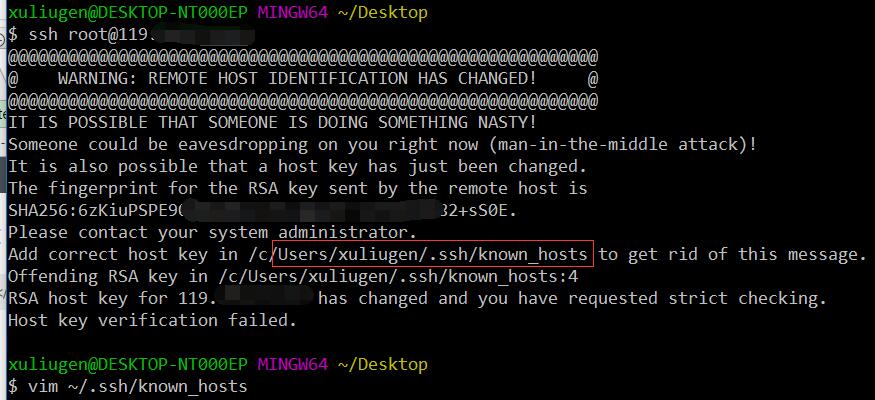
错误信息:
@@@@@@@@@@@@@@@@@@@@@@@@@@@@@@@@@@@@@@@@@@@@@@@@@@@@@@@@@@@
@    WARNING: REMOTE HOST IDENTIFICATION HAS CHANGED!     @
@@@@@@@@@@@@@@@@@@@@@@@@@@@@@@@@@@@@@@@@@@@@@@@@@@@@@@@@@@@
IT IS POSSIBLE THAT SOMEONE IS DOING SOMETHING NASTY!
Someone could be eavesdropping on you right now (man-in-the-middle attack)!
It is also possible that a host key has just been changed.
The fingerprint for the RSA key sent by the remote host is
SHA256:6zKiuPSPE90dB6PNCj1fICgA1DTrTxPFiVbl82+sS0E.
Please contact your system administrator.
Add correct host key in /c/Users/xuliugen/.ssh/known_hosts to get rid of this message.
Offending RSA key in /c/Users/xuliugen/.ssh/known_hosts:4
RSA host key for 119.19.19.19 has changed and you have requested strict checking.
Host key verification failed.
如下图所示:
解决方式
1.在客户端执行下述指令
#vi ~/.ssh/known_hosts2.例如我的机子IP地址为:119.19.19.19
则把里面与所要连接IP(119.19.19.19)相关的内容删掉即可.
本文标题:SSH登录:WARNING: REMOTE HOST IDENTIFICATION HAS CHANGED!
本文链接:https://blog.quwenai.cn/post/3907.html
版权声明:本文不使用任何协议授权,您可以任何形式自由转载或使用。


还没有评论,来说两句吧...