

(1)我们如果使用多个的TextView的话就会挤在一起如下所示: 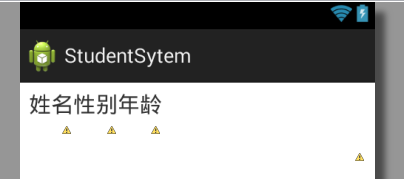
相应的代码如下:
 <LinearLayout
            android:layout_width="wrap_content"
            android:layout_height="40dp" >

            <TextView
                android:layout_width="40dp"
                android:layout_height="40dp"
                android:text="姓名"
                android:textSize="20sp" />

            <TextView
                android:layout_width="40dp"
                android:layout_height="40dp"
                android:text="性别"
                android:textSize="20sp" />
            <TextView
                android:layout_width="40dp"
                android:layout_height="40dp"
                android:text="年龄"
                android:textSize="20sp" />
        </LinearLayout>
(2)如何解决哪?就是在之间添加View,代码如下:
 <LinearLayout
            android:layout_width="wrap_content"
            android:layout_height="40dp" >

            <TextView
                android:layout_width="40dp"
                android:layout_height="40dp"
                android:text="姓名"
                android:textSize="20sp" />
            <View  android:layout_width="wrap_content"
                android:layout_height="1dp"
                android:layout_weight="1" />

            <TextView
                android:layout_width="40dp"
                android:layout_height="40dp"
                android:text="性别"
                android:textSize="20sp" />
            <View
                android:layout_width="wrap_content"
                android:layout_height="1dp"
                android:layout_weight="1" />

            <TextView
                android:layout_width="40dp"
                android:layout_height="40dp"
                android:text="年龄"
                android:textSize="20sp" />
        </LinearLayout>
效果如下: 就变好看了 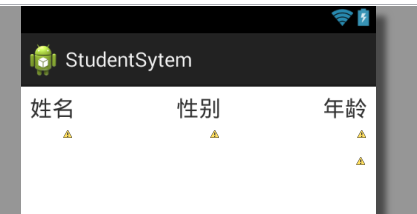
另外值的注意的是:
 <View
    android:layout_width="wrap_content"
    android:layout_height="1dp"
    android:layout_weight="1" />
View的使用的话一定要有宽、高的设置,不然会运行的时候出错!
本文标题:Android中如何使用View填充在多个TextView之间使之等间距
本文链接:https://blog.quwenai.cn/post/3760.html
版权声明:本文不使用任何协议授权,您可以任何形式自由转载或使用。
还没有评论,来说两句吧...