

文章目录
简介
此文基于之前看【Spring5 核心原理】书籍然后综合自己的理解改造了一些功能,简单的概况了springMvc初始化和执行的流程,demo核心的模块如下图
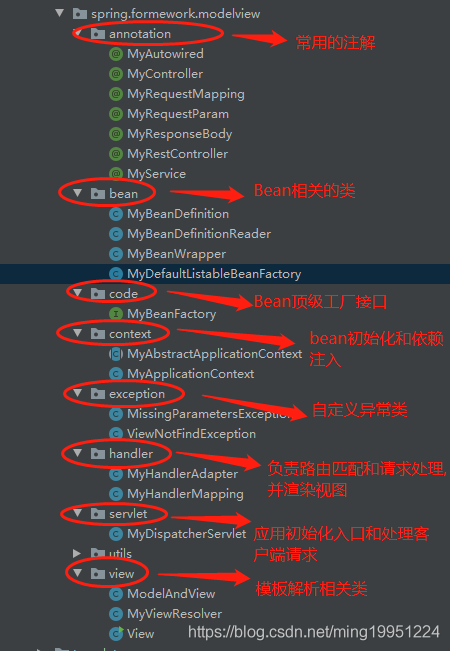
一.用到的相关依赖
- javax.servlet-api: 这个就不需要我讲了吧,刚入行接触的就是servlet,处理请求用doPost,doGet相信大家都接触过
- reflections: 用于扫描接口的实现类使用的
    <dependencies>
        <dependency>
            <groupId>javax.servlet</groupId>
            <artifactId>javax.servlet-api</artifactId>
            <version>3.0.1</version>
            <scope>provided</scope>
        </dependency>
        <dependency>
            <groupId>org.reflections</groupId>
            <artifactId>reflections</artifactId>
            <version>0.9.12</version>
        </dependency>
    </dependencies>
二.相关代码信息
1. annotation包
| 注解名称 | 功能 |
|---|---|
| MyController | 标识控制器返回html视图 |
| MyRestController | 标识控制器,所有方法返回json数据视图 |
| MyRequestMapping | 请求Url配置,有兴趣的小伙伴可以自行实现@doGet,@doPath等RESTful功能注解 |
| MyRequestParam | 请求参数映射 |
| MyResponseBody | 标识返回json数据(目前只做了返回字符串数据,感兴趣的小伙伴可以自行实现该功能) |
| MyAutowired | 实现依赖注入 |
| MyService | 定义业务处理Bean |
@Target(ElementType.FIELD)
@Retention(RetentionPolicy.RUNTIME)
@Documented
public @interface MyAutowired {
    String value() default "";
}

@Target(ElementType.TYPE)
@Retention(RetentionPolicy.RUNTIME)
@Documented
public @interface MyController {}

@Target({ElementType.TYPE,ElementType.METHOD})
@Retention(RetentionPolicy.RUNTIME)
@Documented
public @interface MyRequestMapping {
    String value() default "";
}

@Target(ElementType.PARAMETER)
@Retention(RetentionPolicy.RUNTIME)
@Documented
public  @interface MyRequestParam {
    String value() default "";
    boolean required() default true;
}

@Target({ElementType.TYPE, ElementType.METHOD})
@Retention(RetentionPolicy.RUNTIME)
@Documented
public @interface MyResponseBody {}

@Target(ElementType.TYPE)
@Retention(RetentionPolicy.RUNTIME)
@Documented
public @interface MyRestController {
    String value() default "";
}

@Target(ElementType.TYPE)
@Retention(RetentionPolicy.RUNTIME)
@Documented
public @interface MyService {
    String value() default "";
}
2.bean包
| 类名 | 描述 |
|---|---|
| MyBeanDefinition | 封装Bean名称和对应的className(用于反射生成构建实例) |
| MyDefaultListableBeanFactory | 工程类,用于存储MyBeanDefinition 信息 |
| MyBeanWrapper | 用于包装Bean实例对象 |
| MyBeanDefinitionReader | 根据配置文件的路径扫描需要由spring代理的包 |
| MyBeanFactory | 工厂顶层设计接口 |
public class MyBeanDefinition {
    /**
     * Bean的全类名
     */
    private String beanClassName;

    /**
     * Bean名称,在Ioc容器里存储的Key
     */
    private String beanName;
	//省略 get set方法
 }
 public class MyDefaultListableBeanFactory extends MyAbstractApplicationContext {
    protected final Map<String, MyBeanDefinition> beanDefinitionMap=new ConcurrentHashMap<>();
}
public class MyBeanWrapper {
    private Object wrappedInstance;
    private Class<?> wrappedClass;
    public MyBeanWrapper(Object wrappedInstance) {
        this.wrappedInstance = wrappedInstance;
        this.wrappedClass=wrappedInstance.getClass();
    }
}
public class MyBeanDefinitionReader {
    private String packageName;
    private List<String> registyBeanClasses = new ArrayList<>();
    private Properties config = new Properties();
	//省略get set方法
    /**
     * 固定配置文件的key
     */
    private final String SCAN_PACKAGE = "scanPackage";
    public MyBeanDefinitionReader(String... localtions) {
        //通过资源路径定位到其所应的文件
        try (InputStream is = this.getClass().getClassLoader().getResourceAsStream(localtions[0])) {
            config.load(is);
            scanner(config.getProperty(SCAN_PACKAGE));
        } catch (Exception e) {
            e.printStackTrace();
        }
    }
    /**
     * 扫描需要被sprig管理包
     */
    private void scanner(String packageName) {
        if(this.packageName==null){
            this.packageName=packageName;
        }
        URL url = this.getClass().getClassLoader().getResource("/" + packageName.replaceAll("\\.", "/"));
        File dir = new File(url.getFile());
        for (File file : dir.listFiles()) {
            if (file.isDirectory()) {
                //递归读取包
                scanner(packageName + "." + file.getName());
            } else {
                String className = packageName + "." + file.getName().replace(".class", "");
                //把bean的class信息放入到List中
                registyBeanClasses.add(className);
            }
        }
    }

    /**
     * 把配置文件扫描的所有配置信息转换未MyBeanDefinition对象
     */
    public List<MyBeanDefinition> loadBeanDefinitions() {
        List<MyBeanDefinition> result = new ArrayList<>();
        try {
            for (String className : registyBeanClasses) {
                Class<?> beanClass = Class.forName(className);
                 //接口不需要处理
                if (beanClass.isInterface()) {
                    continue;
                }
                 //只处理需要包含指定需要代理类的注解的类
                if(beanClass.isAnnotationPresent(MyController.class) || beanClass.isAnnotationPresent(MyRestController.class) ||  beanClass.isAnnotationPresent(MyService.class)){
                    result.add(createBeanDefinition(StringUtils.toLowerFirstWord(beanClass.getSimpleName()), beanClass.getName()));
                }
            }
        } catch (Exception e) {
            e.printStackTrace();
        }
        return result;
    }

    private MyBeanDefinition createBeanDefinition(String beanName, String beanClassName) {
        MyBeanDefinition myBeanDefinition = new MyBeanDefinition();
        myBeanDefinition.setBeanName(beanName);
        myBeanDefinition.setBeanClassName(beanClassName);
        return myBeanDefinition;
    }
}
public interface MyBeanFactory {
    /**
     *根据bean名称获取实例
     */
    Object getBean(String beanName) throws Exception;
     /**
     *根据bean类名获取实例
     */
    Object getBean(Class<?> beanClass) throws Exception;
}
3.context包
| 类名 | 描述 |
|---|---|
| MyAbstractApplicationContext | 定义Ioc容器的公共逻辑 |
| MyApplicationContext | 实现ioc容器初始化和依赖注入功能 |
public  abstract  class MyAbstractApplicationContext {
   public   void refresh() throws Exception{}
}
public class MyApplicationContext extends MyDefaultListableBeanFactory implements MyBeanFactory {

    private String[] configLocations;
    private MyBeanDefinitionReader reader;
    private Properties config;

    /**
     * ioc容器,存放需要由spring管理的Bean实例
     */
    private Map<String, Object> factoryBeanObjectCache = new HashMap<>();

    /**
     * 存放Bean包装器信息
     */
    private Map<String, MyBeanWrapper> factoryBeanInstanceCache = new HashMap<>();

    public Map<String, Object> getFactoryBeanObjectCache() {
        return factoryBeanObjectCache;
    }


    public Properties getConfig() {
        return config;
    }

    public MyApplicationContext(String... configLocations) {
        this.configLocations = configLocations;
        try {
            refresh();
        } catch (Exception e) {
            e.printStackTrace();
        }
    }

    @Override
    public Object getBean(String beanName) throws Exception {
        MyBeanDefinition beanDefinition = super.beanDefinitionMap.get(beanName);
        try {
        	//重ioc容器中获取bean实例
            Object instance = instantiateBean(beanDefinition);
            if (null == instance) {
                return null;
            }
            //把bean实例放入包装器中
            MyBeanWrapper beanWrapper = new MyBeanWrapper(instance);
            this.factoryBeanInstanceCache.put(beanName, beanWrapper);
             //依赖注入
            populateBean(instance);
            return this.factoryBeanInstanceCache.get(beanName).getWrappedInstance();
        } catch (Exception e) {
            return null;
        }
    }

    /**
     * 注入依赖的Bean
     */
    private void populateBean(Object instance) {
        Class clas = instance.getClass();
        Field[] fields = clas.getDeclaredFields();
        for (Field field : fields) {
            if (!field.isAnnotationPresent(MyAutowired.class)) {
                continue;
            }
            MyAutowired autowired = field.getAnnotation(MyAutowired.class);
            String autowiredBeanName = autowired.value().trim();
            if ("".equals(autowiredBeanName)) {
                autowiredBeanName = StringUtils.toLowerFirstWord(field.getType().getSimpleName());
            }
            field.setAccessible(true);
            try {
                boolean insertBeanDefinition = false;
                MyBeanDefinition myBeanDefinition;
                if (super.beanDefinitionMap.containsKey(autowiredBeanName)) {
                    // 当 @MyAutowired UserServiceImpl重ioc容器获取bean
                    myBeanDefinition = super.beanDefinitionMap.get(autowiredBeanName);
                } else {
                    //当 @MyAutowired UserService,则找到接口的实现类封装成bean修饰器然后再注入bean实例
                    String subClassName = ClassUtils.getInterfaceImpl(reader.getPackageName(), field.getType());
                    myBeanDefinition = super.beanDefinitionMap.get(subClassName);
                    insertBeanDefinition = true;
                }
                if (myBeanDefinition == null) {
                    continue;
                }
                Object autowiredInstance = instantiateBean(myBeanDefinition);
                if (null == instance) {
                    continue;
                }
                if (insertBeanDefinition) {
                    //把UserService和UserServiceImpl对应的修饰器类对应上,避免别的地方依赖注入的时候又重新调用一次获取接口子类的逻辑
                    super.beanDefinitionMap.put(autowiredBeanName, myBeanDefinition);
                }
                field.set(instance, autowiredInstance);
            } catch (Exception e) {
                e.printStackTrace();
            }
        }
    }

    /**
     * 传入一个BeanFefinition返回一个实例,如果实例存在,重ioc容器中获取
     * 使用到了 【注册式单例模式】
     */
    private Object instantiateBean(MyBeanDefinition beanDefinition) {
        Object instance = null;
        String className = beanDefinition.getBeanClassName();
        try {
            //根据className确定类是否有示例
            if (this.factoryBeanObjectCache.containsKey(className)) {
                instance = this.factoryBeanObjectCache.get(className);
            } else {
                Class<?> clas = Class.forName(className);
                instance = clas.newInstance();
                this.factoryBeanObjectCache.put(className, instance);
            }
            return instance;
        } catch (Exception e) {
            e.printStackTrace();
        }
        return null;
    }

    @Override
    public Object getBean(Class<?> beanClass) throws Exception {
        return this.getBean(beanClass.getName());
    }

    @Override
    public void refresh() throws Exception {
        //1.定位配置文件
        reader = new MyBeanDefinitionReader(this.configLocations);
        this.config = reader.getConfig();
        //2.加载配置文件,扫描相关的类,把它们封装成BeanDefinition
        List<MyBeanDefinition> beanDefinitionList = reader.loadBeanDefinitions();
        //3.把bean信息放入到map中
        registerBeanFefinition(beanDefinitionList);
        //4.控制反转和依赖注入
        autowrited();
    }

    private void autowrited() {
        for (Map.Entry<String, MyBeanDefinition> beanDefinitionEntry : super.beanDefinitionMap.entrySet()) {
            String beanName = beanDefinitionEntry.getKey();
            try {
                getBean(beanName);
            } catch (Exception e) {
                e.printStackTrace();
            }
        }
    }

    private void registerBeanFefinition(List<MyBeanDefinition> beanDefinitionList) throws Exception {
        for (MyBeanDefinition beanDefinition : beanDefinitionList) {
            if (super.beanDefinitionMap.containsKey(beanDefinition.getBeanName())) {
                throw new Exception("The " + beanDefinition.getBeanName() + " is exists");
            }
            super.beanDefinitionMap.put(beanDefinition.getBeanName(), beanDefinition);
        }
    }
}
4.handler
| 类名 | 描述 |
|---|---|
| MyHandlerAdapter | 处理请求并返回视图或者json数据(使用到了适配器模式) |
| MyHandlerMapping | 用来存储路由和请求参数信息。 |
public class MyHandlerAdapter {

    public boolean supports(Object handler) {
        return (handler instanceof MyHandlerMapping);
    }

    public ModelAndView handle(HttpServletRequest request, HttpServletResponse response, MyHandlerMapping handler) throws Exception {
        //获取方法的参数列表
        Class<?>[] parameterTypes = handler.getMethod().getParameterTypes();

        //保存参数值
        Object[] paramValues = new Object[parameterTypes.length];

        //获取请求的参数
        Map<String, String[]> parameterMap = request.getParameterMap();

        for (Map.Entry<String, String[]> entry : parameterMap.entrySet()) {
            if (!handler.getParamIndexMapping().containsKey(entry.getKey())) {
                continue;
            }
            int index = handler.getParamIndexMapping().get(entry.getKey());
            paramValues[index] = DispatcherServletUtils.convert(parameterTypes[index], entry.getValue());
            if (handler.requiredList != null) {
                //重必选参数列表移除存在的key
                handler.requiredList.remove(entry.getKey());
            }
        }

        if (handler.requiredList != null && handler.requiredList.size() > 0) {
            throw new MissingParametersException(handler.requiredList.toString() + "是必选参数,不能为null");
        }

        if (handler.paramIndexMapping.containsKey(HttpServletRequest.class.getName())) {
            int index = handler.paramIndexMapping.get(HttpServletRequest.class.getName());
            paramValues[index] = request;
        }
        if (handler.paramIndexMapping.containsKey(HttpServletResponse.class.getName())) {
            int index = handler.paramIndexMapping.get(HttpServletResponse.class.getName());
            paramValues[index] = response;
        }
        if (handler.paramIndexMapping.containsKey(HttpSession.class.getName())) {
            int index = handler.paramIndexMapping.get(HttpSession.class.getName());
            paramValues[index] = request.getSession();
        }

            //利用反射机制来调用 第一个参数是method所对应的实例 在ioc容器中
            Object returnValue = handler.getMethod().invoke(handler.controller, paramValues);
            if (returnValue == null) {
                return null;
            }
            boolean isModelAndView = handler.getMethod().getReturnType() == ModelAndView.class;
            if (isModelAndView) {
                return (ModelAndView) returnValue;
            } else {
                //判断当前控制器是否包含MyRestController注解或者当前调用的方法是否包含MyResponseBody注解
                if(handler.getMethod().isAnnotationPresent(MyResponseBody.class) ||  handler.controller.getClass().isAnnotationPresent(MyRestController.class))
                {
                    response.setCharacterEncoding("UTF-8");
                    response.setHeader("Content-Type", "text/html; charset=UTF-8");
                    response.getWriter().write(returnValue.toString());
                    return  null;
                }
                //抛出视图未找到异常
                throw  new ViewNotFindException(returnValue.toString());
            }

    }

}
public class MyHandlerMapping {
    //保存方法对应的实例
    protected Object controller;
    //保存映射的方法
    protected Method method;
    //参数顺序
    protected Map<String, Integer> paramIndexMapping;
    //必选参数列表吧
    protected List<String> requiredList;

    public Method getMethod() {
        return method;
    }

    public Map<String, Integer> getParamIndexMapping() {
        return paramIndexMapping;
    }

    /**
     * 构建一个Handler的基本参数
     */
    public MyHandlerMapping(Object controller, Method method) {
        this.controller = controller;
        this.method = method;
        initParamIndexMapping(method);
    }

    private void initParamIndexMapping(Method method) {
        paramIndexMapping = new HashMap<>();
        requiredList = new ArrayList<>();
        //提取方法注解参数
        Annotation[][] param = method.getParameterAnnotations();
        MyRequestParam mrp;
        for (int i = 0; i < param.length; i++) {
            for (Annotation a : param[i]) {
                if (a instanceof MyRequestParam) {
                    mrp = ((MyRequestParam) a);
                    String paramName = mrp.value();
                    if (!"".equals(paramName.trim())) {
                        paramIndexMapping.put(paramName, i);
                    }
                    if (mrp.required()) {
                        requiredList.add(paramName);
                    }
                }
            }
        }
        if (requiredList.size() == 0) {
            requiredList = null;
        }
        //提取方法中的request,response,session参数
        Class<?> paramsTypes[] = method.getParameterTypes();
        for (int i = 0; i < paramsTypes.length; i++) {
            Class<?> type = paramsTypes[i];
            if (type == HttpServletRequest.class || type == HttpServletResponse.class || type == HttpSession.class) {
                paramIndexMapping.put(type.getName(), i);
            }
        }
    }
}
5. view包
| 类名 | 描述 |
|---|---|
| ModelAndView | 返回视图名称和页面需要的model数据 |
| View | 封装页面文件信息和渲染页面流程 |
| MyViewResolver | 把静态文件转换为动态文件 |
public class ModelAndView {
    private String ViewName;
    private Map<String, ?> model;
    public ModelAndView(String viewName, Map<String, ?> model) {
        ViewName = viewName;
        this.model = model;
    }
}
public class View {
    private static final String DEFAULT_CONTENT_TYPE = "text/html;charset=utf-8";
    private static final Pattern pattern = Pattern.compile("\\$\\{[^\\}]+\\}", Pattern.CASE_INSENSITIVE);
    private File viewFile;
    public View(File viewFile) {
        this.viewFile = viewFile;
    }
    public String getContentType() {
        return DEFAULT_CONTENT_TYPE;
    }
    private static String makeStringForRegExp(String str) {
        return str.replace("\\", "\\\\").replace("*", "\\*")
                .replace("+", "\\+").replace("|", "\\|")
                .replace("{", "\\{").replace("}", "\\}")
                .replace("(", "\\(").replace(")", "\\)")
                .replace("^", "\\^").replace("$", "\\$")
                .replace("[", "\\[").replace("]", "\\]")
                .replace("?", "\\?").replace(",", "\\,")
                .replace(".", "\\.").replace("&", "\\&");
    }
    public void render(Map<String, ?> model, HttpServletRequest request, HttpServletResponse response) throws Exception {
        StringBuilder sb = new StringBuilder();
        RandomAccessFile ra = new RandomAccessFile(this.viewFile, "r");
        try {
            String line = null;
            Matcher matcher;
            while (null != (line = ra.readLine())) {
                line = new String(line.getBytes("ISO-8859-1"), "utf-8");
                matcher = pattern.matcher(line);
                while (matcher.find()) {
                    String paramName = matcher.group();
                    paramName = paramName.replaceAll("\\$\\{|}", "");
                    Object paramValue = model.get(paramName);
                    if (null == paramValue) {
                        paramValue = "";
                    }
                    line = matcher.replaceFirst(makeStringForRegExp(paramValue.toString()));
                    matcher = pattern.matcher(line);
                }
                sb.append(line);
            }
        } finally {
            ra.close();
        }
        response.setCharacterEncoding("utf-8");
        response.getWriter().write(sb.toString());
    }
public class MyViewResolver {
    private final String DEFALUT_TEMPALTE_SUFIX = ".html";
    // 视图目录
    private File templateRootDir;
    public MyViewResolver(String templateRootPath) {
        this.templateRootDir = new File(templateRootPath);
    }
    // 通过页面Name,返回相应View视图
    public View resolveViewName(String viewName, Locale locale) {
        if (null == viewName || "".equals(viewName.trim())) {
            return null;
        }
        // 给没有 .html的加上后缀(我们可以在ModelAndView中写500.html,也可以直接写 500)
        viewName = viewName.endsWith(DEFALUT_TEMPALTE_SUFIX) ? viewName : (viewName + DEFALUT_TEMPALTE_SUFIX);
        // 返回相应视图
        File templateFile = new File((templateRootDir.getPath() + "/" + viewName).replaceAll("/+", "/"));
        return new View(templateFile);
    }
}
6. servlet包
public class MyDispatcherServlet extends HttpServlet {

    private Logger log = Logger.getLogger(this.getClass().getName());

    MyApplicationContext applicationContext;

    /**
     * 保存接口和方法路由映射关系
     */
    private Map<String, MyHandlerMapping> handlerMapping = new HashMap();

    /**
     * 存放路由和处理器映射关系
     */
    private Map<MyHandlerMapping, MyHandlerAdapter> handlerAdapterMap = new HashMap<>();

    /**
     * 保存视图解析器的容器
     */
    private List<MyViewResolver> viewResolvers = new ArrayList<>();

    @Override
    public void init(ServletConfig config) throws ServletException {
        super.init();
        log.info("初始化MyDispatcherServlet");
        //初始化应用程序上下文,处理ioc和dl核心功能流程
        applicationContext = new MyApplicationContext(config.getInitParameter("contextConfigLocation"));
        //初始化策略,加载必须要使用的组件
        initStrategies(applicationContext);
    }

    protected void initStrategies(MyApplicationContext applicationContext) {

        // 1.初始化视图转换器,必须实现
        initViewResolvers(applicationContext);

        //2.加载接口和方法映射
        initHandlerMapping(applicationContext);
        //3.加载适配器
        initHandlerAdapter(applicationContext);
    }

    private void initHandlerAdapter(MyApplicationContext applicationContext) {
        MyHandlerAdapter myHandlerAdapter;
        for (MyHandlerMapping myHandlerMapping : handlerMapping.values()) {
            //此处实际用的是同一个适配器,实际可能根据HandlerMapping类型分配不同的适配器
            myHandlerAdapter=new MyHandlerAdapter();
            if(myHandlerAdapter.supports(myHandlerMapping)){
                this.handlerAdapterMap.put(myHandlerMapping,myHandlerAdapter);
            }
        }
    }

    @Override
    protected void doPost(HttpServletRequest req, HttpServletResponse resp) throws ServletException, IOException {
        log.info("执行MyDispatcherServlet的doPost()");
        try {
            //处理请求
            doDispatch(req, resp);
        } catch (Exception e) {
            try {
                Map model = new HashMap();
                model.put("msg", e.getMessage());
                model.put("stackTrace", e.getStackTrace());
                processDispatchResult(req, resp, new ModelAndView("500.html",model));
            } catch (Exception er) {
                er.printStackTrace();
            }
        }
    }

    @Override
    protected void doGet(HttpServletRequest req, HttpServletResponse resp) throws ServletException, IOException {
        log.info("执行MyDispatcherServlet的doGet()");
        doPost(req, resp);
    }

    private void doDispatch(HttpServletRequest req, HttpServletResponse resp) throws Exception {
        if (handlerMapping.isEmpty()) {
            return;
        }
        String url = req.getRequestURI();
        String contextPath = req.getContextPath();
        url = url.replace(contextPath, "").replaceAll("/+", "/");
        if (!this.handlerMapping.containsKey(url)) {
            processDispatchResult(req, resp, new ModelAndView("404.html"));
            return;
        }
        MyHandlerMapping handler = this.handlerMapping.get(url);
        MyHandlerAdapter myHandlerAdapter = getHandlerAdapter(handler);

        ModelAndView myModelAndView = myHandlerAdapter.handle(req, resp, handler);
        //输出结果
        processDispatchResult(req, resp, myModelAndView);
    }

    private void processDispatchResult(HttpServletRequest req, HttpServletResponse resp, ModelAndView mv) throws Exception {
        if (null == mv) {
            return;
        }
        if (this.viewResolvers.isEmpty()) {
            return;
        }
        for (MyViewResolver myViewResolver : this.viewResolvers) {
            View view = myViewResolver.resolveViewName(mv.getViewName(), null);
            if (view != null) {
                view.render(mv.getModel(), req, resp);
                return;
            }
        }
    }


    private MyHandlerAdapter getHandlerAdapter(MyHandlerMapping handlerMapping) {
        if (this.handlerAdapterMap.isEmpty()) return null;
        MyHandlerAdapter myHandlerAdapter = this.handlerAdapterMap.get(handlerMapping);
        if (myHandlerAdapter.supports(handlerMapping)) {
            return myHandlerAdapter;
        }
        return null;
    }

    /**
     * 初始化控制器
     */
    private void initHandlerMapping(MyApplicationContext context) {

        if (context.getFactoryBeanObjectCache().size() == 0) {
            return;
        }

        try {
            for (Map.Entry<String, Object> entry : context.getFactoryBeanObjectCache().entrySet()) {
                Class<? extends Object> clazz = entry.getValue().getClass();
                if (!clazz.isAnnotationPresent(MyController.class) && !clazz.isAnnotationPresent(MyRestController.class)) {
                    continue;
                }

                //拼url时,是controller头的url拼上方法上的url
                String baseUrl = "";
                if (clazz.isAnnotationPresent(MyRequestMapping.class)) {
                    MyRequestMapping annotation = clazz.getAnnotation(MyRequestMapping.class);
                    baseUrl = annotation.value();
                }

                if (!baseUrl.startsWith("/")) {
                    baseUrl = "/" + baseUrl;
                }

                Method[] methods = clazz.getMethods();

                MyRequestMapping annotation;
                for (Method method : methods) {
                    if (!method.isAnnotationPresent(MyRequestMapping.class)) {
                        continue;
                    }
                    annotation = method.getAnnotation(MyRequestMapping.class);
                    String url = annotation.value();
                    if(url.trim().length()>0){
                        url = (baseUrl + "/" + url).replaceAll("/+", "/");
                    }else{
                        url=baseUrl;
                    }
                    handlerMapping.put(url, new MyHandlerMapping(entry.getValue(), method));
                    System.out.println("mapping " + url + "," + method);
                }
            }

        } catch (Exception e) {
            e.printStackTrace();
        }

    }

    private void initViewResolvers(MyApplicationContext context) {
        // 拿到在配置文件中配置的模板存放路径(layouts)
        String templateRoot = context.getConfig().getProperty("templateRoot");

        // 通过相对路径找到目标后,获取到绝对路径
        // 注:getResourse返回的是URL对象,getFile返回文件的绝对路径
        String templateRootPath = this.getClass().getClassLoader().getResource(templateRoot).getFile();
        // 视图解析器可以有多种,且不同的模板需要不同的Resolver去解析成不同的View(jsp,html,json。。)
        // 但这里其实就只有一种(解析成html)
            this.viewResolvers.add(new MyViewResolver(templateRootPath ));
    }


}
7.其它非核心类
| 类名 | 描述 |
|---|---|
| ClassUtils | 获取接口的实例 |
| StringUtils | 将字符串中的首字母小写 |
| MissingParametersException | 自定义参数缺失异常 |
| ViewNotFindException | 自定义视图没找到异常 |
public class ClassUtils {

    /**
     * 获取接口的实现类
     */
    public static String getInterfaceImpl(String packageName, Class classz) {
        Reflections reflections = new Reflections(packageName);
        Set<? extends Class> classes = reflections.getSubTypesOf(classz);
        String beanClassName = null;
        for (Class clazz : classes) {
            beanClassName = clazz.getSimpleName();
            beanClassName=StringUtils.toLowerFirstWord(beanClassName);
            break;
        }
        return beanClassName;
    }

    public static void main(String[] args) {
        String beanClassName=getInterfaceImpl("com.ljm.demo", UserService.class);
        //返回userServiceImpl
        System.out.println(beanClassName);
    }
}
public class StringUtils {
    public static String toLowerFirstWord(String name) {
        char[] charArray = name.toCharArray();
        charArray[0] += 32;
        return String.valueOf(charArray);
    }
}
public class MissingParametersException extends Exception {
    public MissingParametersException() { }
    public MissingParametersException(String message) {
        super(message);
    }
}
public class ViewNotFindException extends Exception {
    public ViewNotFindException() { }
    public ViewNotFindException(String message) {
        super(String.format("没有找到 [%s.html] 文件",message));
    }
}
三.初始化流程
1.配置需要被扫描包和模板路径
application.properties文件内容如下
scanPackage=com.ljm.demo
templateRoot=/templates
2.web入口
首先需要重web.xml中配置MyDispatcherServlet类和路由绑定。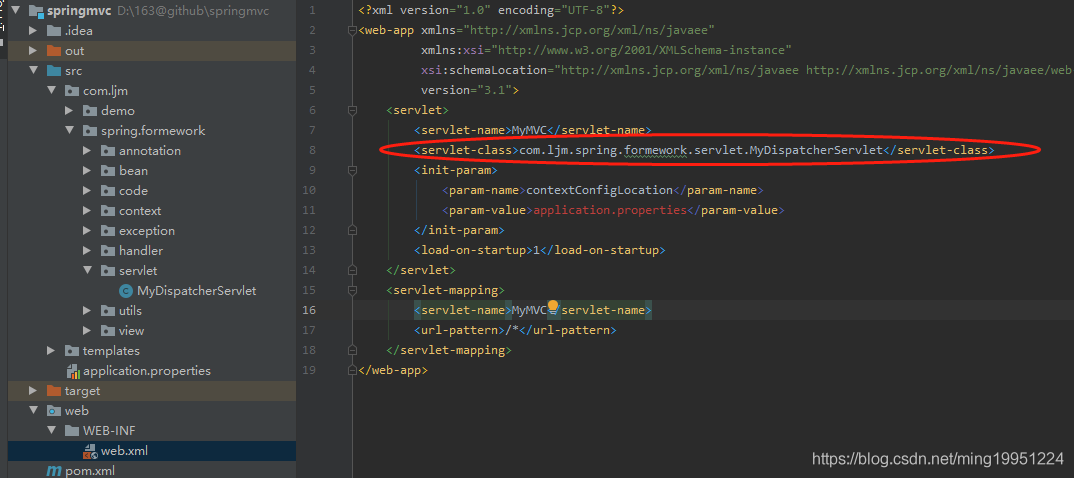
启动应用会访问MyDispatcherServlet的init()方法执行初始化流程,首先会去构建MyApplicationContext实例,通过有参构造函数把application.properties文件的路径传递进去了**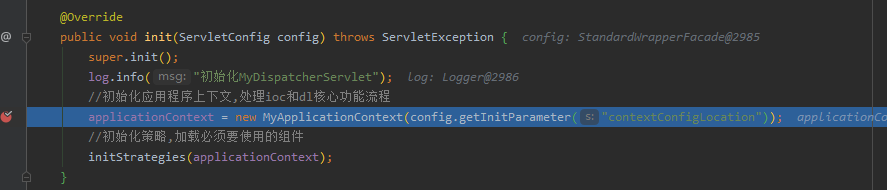
3.ioc控制反转和dl依赖注入
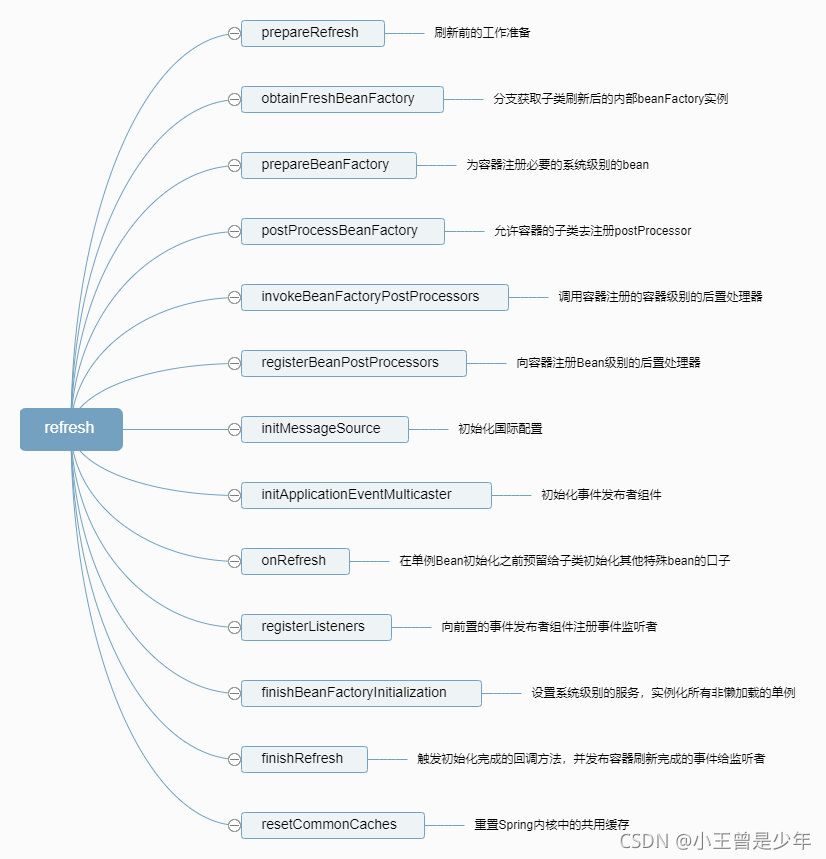
在MyApplicationContext构造函数中会执行refresh()方法,refresh()方法中会进行ioc控制反转和依赖注入方法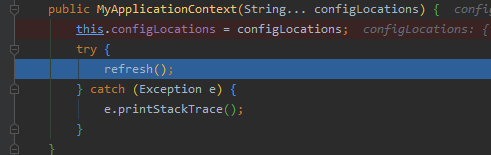
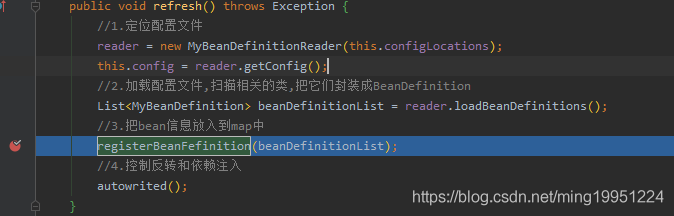
2.1.通过MyBeanDefinitionReader构造,把指定包下的所有类都加到了registyBeanClasses列表中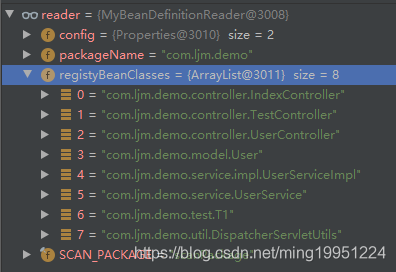
2.2 通过执行MyBeanDefinitionReader的loadBeanDefinitions方法,进行了类的过滤,然后执行registerBeanFefinition方法把信息放入map中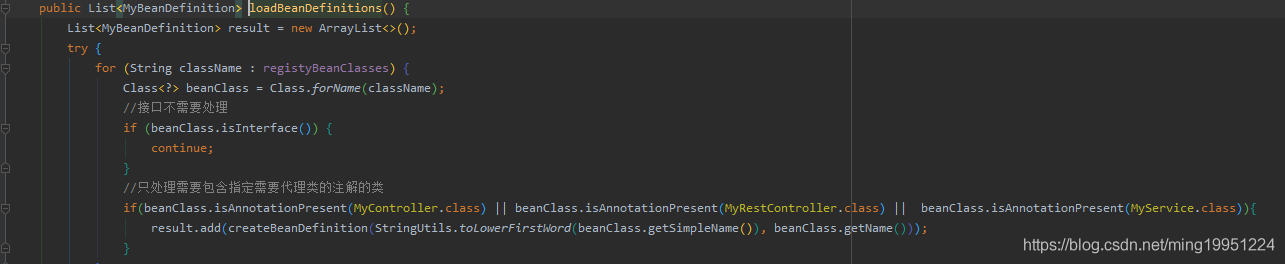
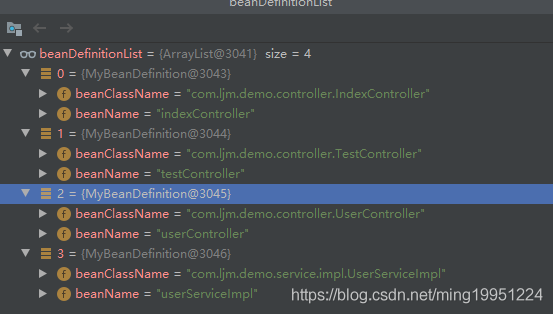
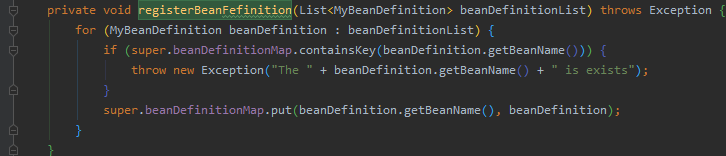
2.3 通过执行autowrited方法然后迭代调用getBean方法进行ioc和dl操作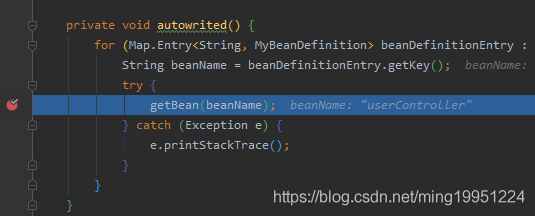
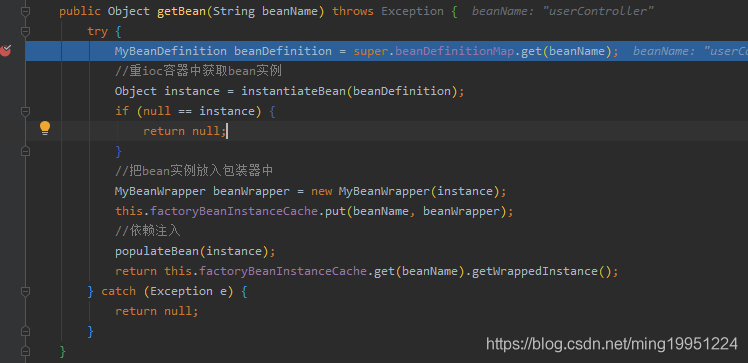
通过执行super.beanDefinitionMap.get(beanName)方法去获取Bean的配置信息,然后通过调用instantiateBean方法重ioc容器中获取bean实例,如果不存在则通过反射生成实例并放入ioc容器中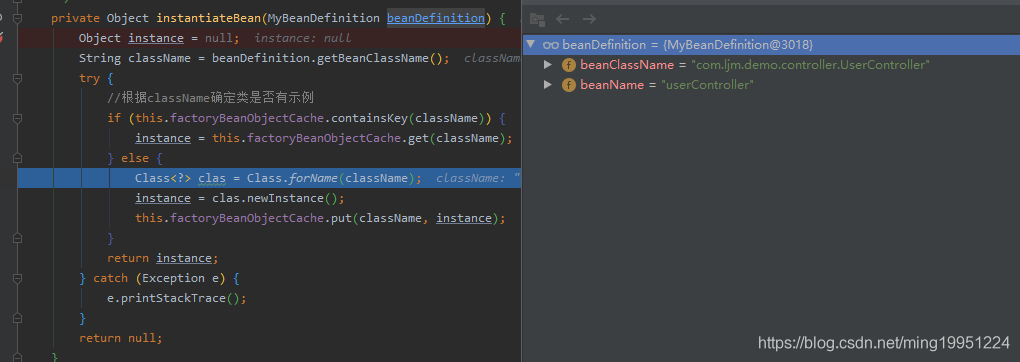
然后把获取的实例放入包装器中,再放入到缓存中
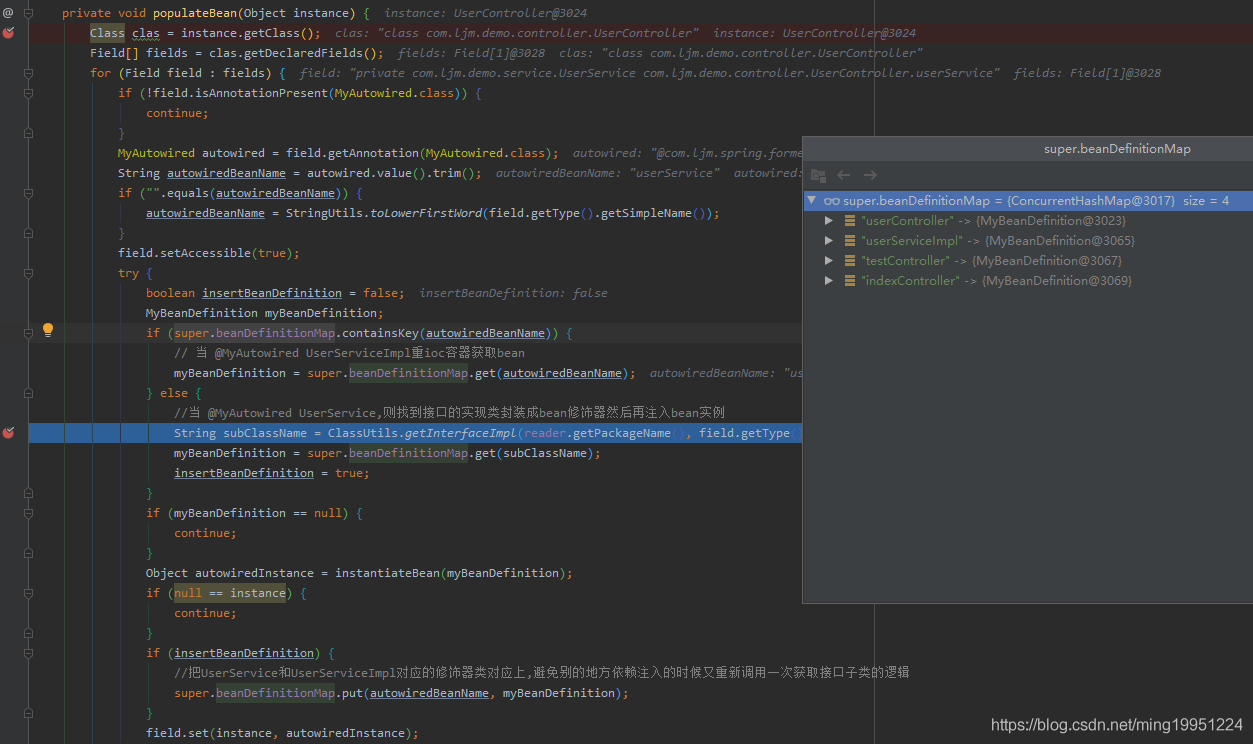
然后执行populateBean方法进行依赖注入,整体执行逻辑如下
- 1.获取实例的类信息,然后获取类的所有字段
- 2.遍历字段,如果当前字段包含MyAutowired注解,则往下执行依赖注入的逻辑
- 3.先重MyAutowired的value字段中获取bean名称,如果未配置默认使用去字段类名并首字母小写,并设置暴力访问该字段。
- 4.通过要注入的bean名称去获取对应的Bean配置信息,由于beanDefinitionMap只管理了类信息没有管理类实现的接口信息,当MyAutowired注解注入的是一个接口类型的时候需要通过工具类获取接口的实现类信息
- 5.然后通过instantiateBean方法重ioc容器中获取需要被注入的Bean实例
- 6.最后通过 field.set(instance, autowiredInstance)把需要注入的对象赋值给字段
最后返回Bean的包装器对象
4 初始化视图转换器
通过执行initViewResolvers方法加载视图转换器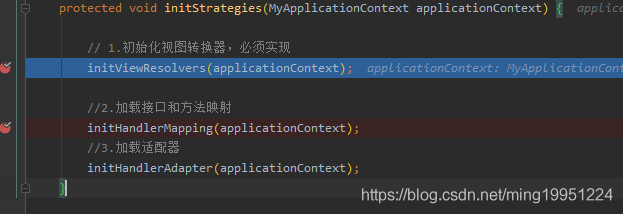
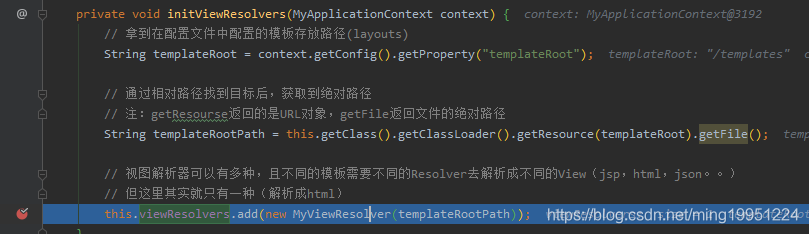
整体执行逻辑如下
- 1.获取配置文件配置好的模板存放目录。
- 2.往视图解析器列表里放入html解析器
5.初始化资源映射
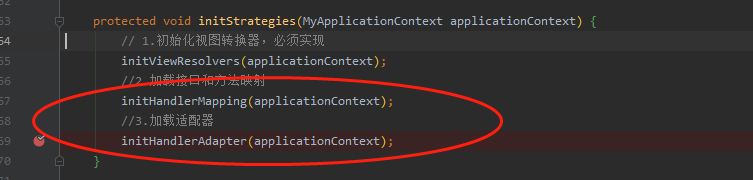
执行initHandlerMapping进行映射,处理逻辑如下
- 1.遍历由ioc容器管理的Bean
- 2.获取当前类包含MyController注解或者MyRestController注解则进行下面的处理
- 3.获取类的路由地址
- 4.便利该类的所有方法,处理包含MyRequestMapping注解方法,把方法路由地址然后和类的拼接上,然后封装成MyHandlerMapping对象放入资源路径容器中
- 5.在MyHandlerMapping构造函数中对MyRequestParam注解进行绑定,并把必选参数名称加入到requiredList中
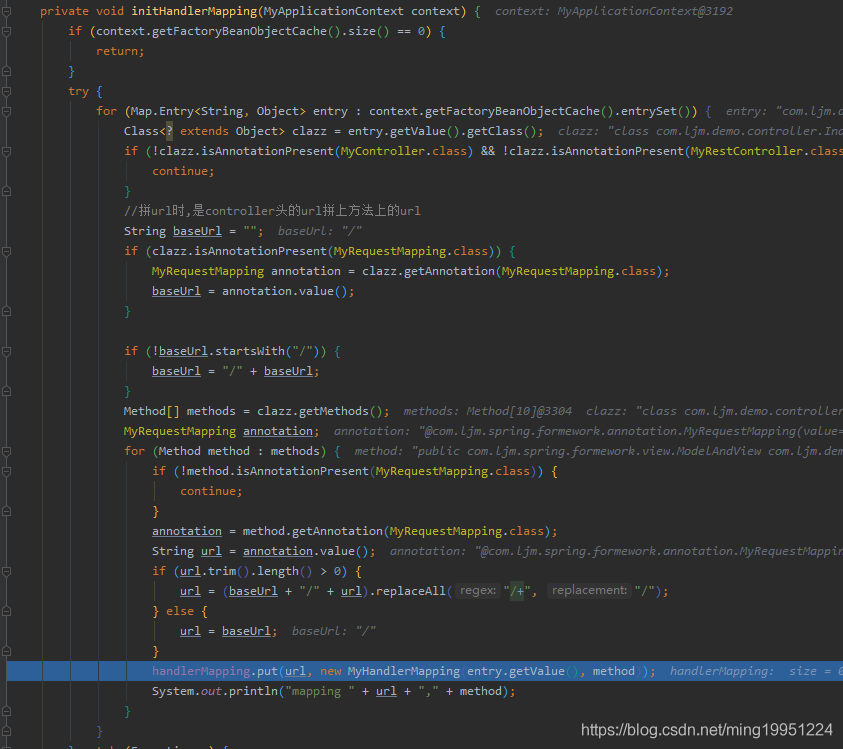
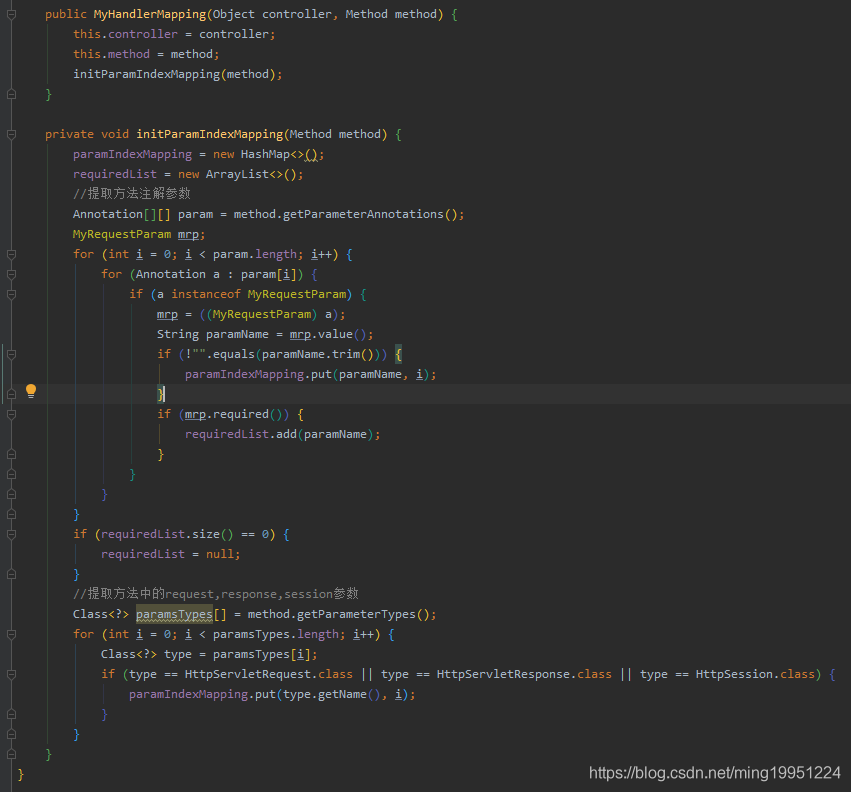
初始化HandlerMapping使用的适配器。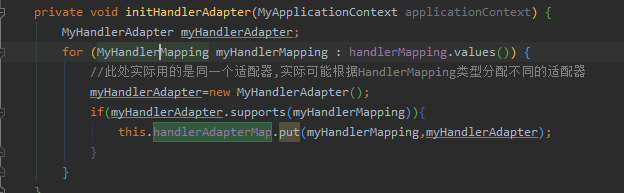
四. 处理请求流程
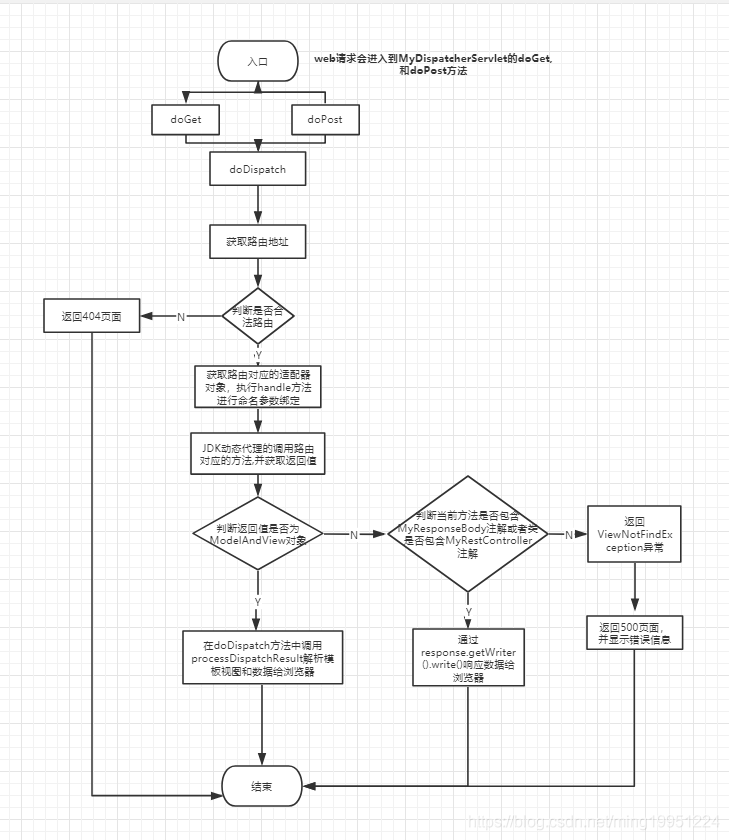
发送post请求后会被MyDispatcherServlet的doPost方法处理,然后doPost委托给doDispatch方法处理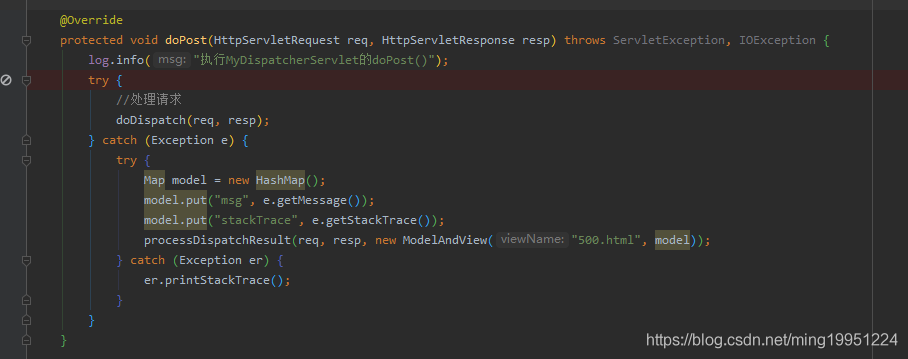
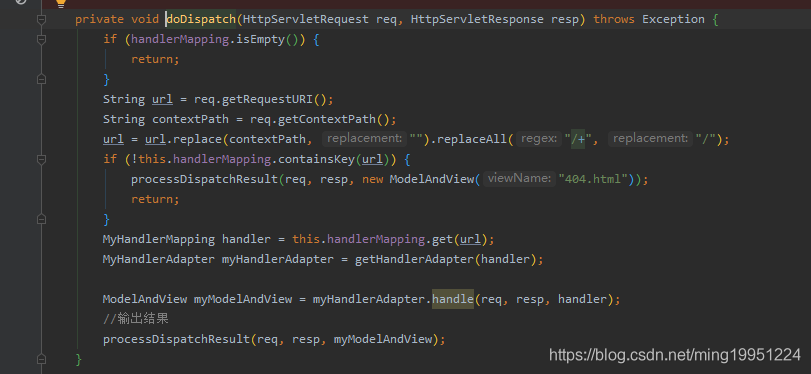
执行逻辑如下
- 1.判断handlerMapping容器是否有元素,没有则返回null。
- 2.获取请求路径,如果路径包含连续的/符号,替换成一个。
- 3.如果handlerMapping不包含当前请求的url,返回404页面。
- 4.获取路由对应的适配器myHandlerAdapter,并执行handle方法
- 5.然后把request请求中的参数和MyRequestParam注解对应的参数进行命名绑定。
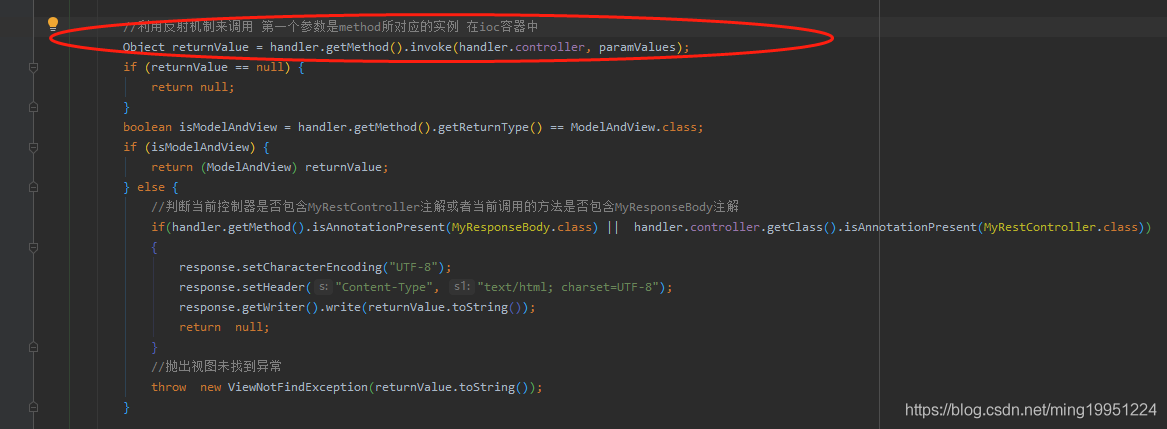
- 6.通过JDK动态代理的调用路由对应的方法,并获取返回值 Object returnValue = handler.getMethod().invoke(handler.controller, paramValues);
- 7.判断返回值类型,如果不是ModelAndView类型,则判断当前方法是否包含MyResponseBody注解或者类是否包含MyRestController注解,如果包含则通过response.getWriter().write()响应数据给浏览器,不包含则返回ViewNotFindException异常
- 8.如果返回值类型是ModelAndView则把返回值转换成ModelAndView并返回
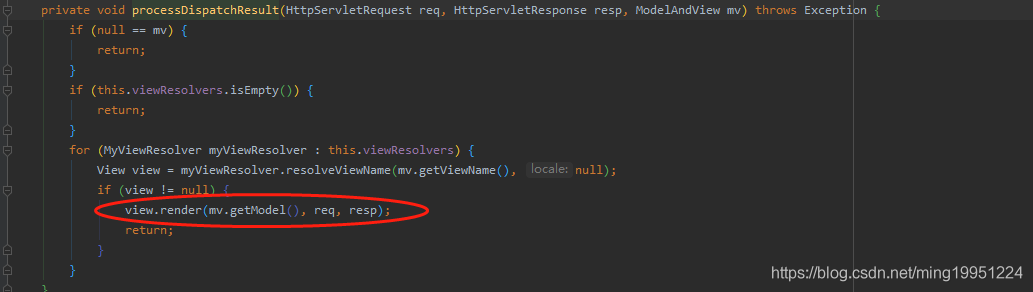
- 9.最后在doDispatch方法中调用processDispatchResult解析模板视图和数据给浏览器。
- 10.通过视图名称找到模板文件,并把数据渲染渲染到模板的表达式上。
五.测试效果
1.测试返回视图
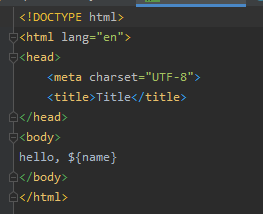
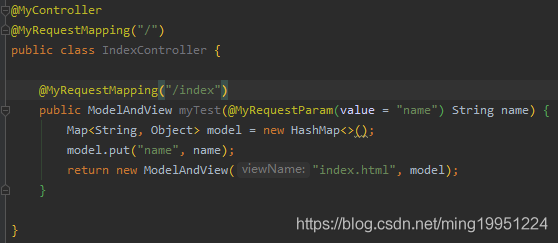
MyRequestParam注解的required默认值是true,如果不传参数页面会返回某个参数是必填的错误提示。
输入:http://localhost:8080/index,
输出如下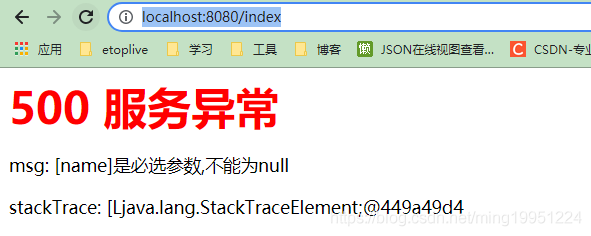
输入: http://localhost:8080/index?test
输出如下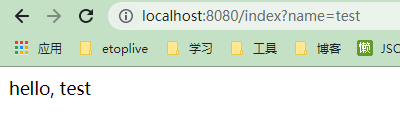
2. 测试返回json数据
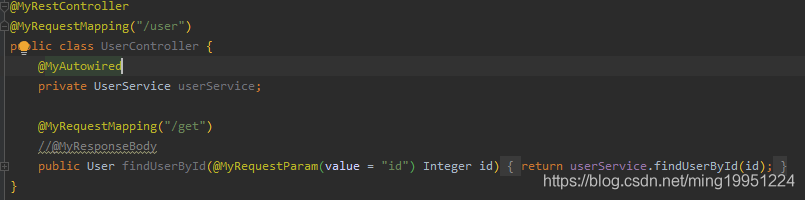
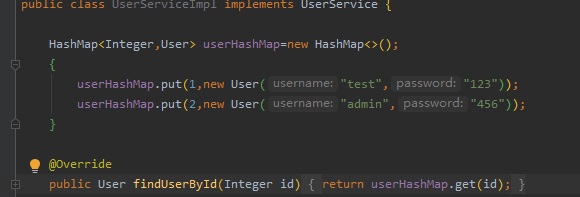
输入: http://localhost:8080/user/get?id=1
输出如下: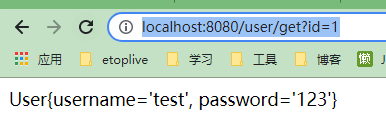
六. 总结
目前这个简配版用到的设计模式有注册式单例模式,工厂模式,包装器模式,代理模式,代码和源码比起来太粗糙了,但是把一些比较核心实现功能都列出来了,相对于读源码去理解springmvc执行流程要简单不少,由于篇幅有限,一些测试代码就没贴出来,配套代码放到gitlab上,感兴趣的可以自行下载。
github下载地址: https://github.com/Dominick-Li/springmvc/
要是觉得我写的对你有点帮助的话,麻烦在github上帮我点下 Star
还没有评论,来说两句吧...